Publishing CRM · Billing & Invoicing
Automate recurring contracts, multi-issue invoicing, payment posting, and A/R aging—all inside your publishing CRM. No more spreadsheets, no more manual reconciliation.
Magazine Manager's billing and invoicing module is purpose-built for the publishing industry. Generate invoices quickly, track payments in real time, and automate recurring billing cycles for multi-issue contracts. Integrated directly with your CRM and production workflow, every ad order flows seamlessly from proposal to invoice to payment—eliminating dual entry and reducing billing errors.
"We are able to electronically invoice clients in literally minutes, take payments, and with a click of a button know what our clients' ad schedules are, what they have paid and what they owe."
Lisa B., Advertising Manager — Legal Services Publisher
Trusted by 33,000+ media products
Real-time payments
Proposal → Invoice → Paid
A billing system designed specifically for magazine ad sales workflows
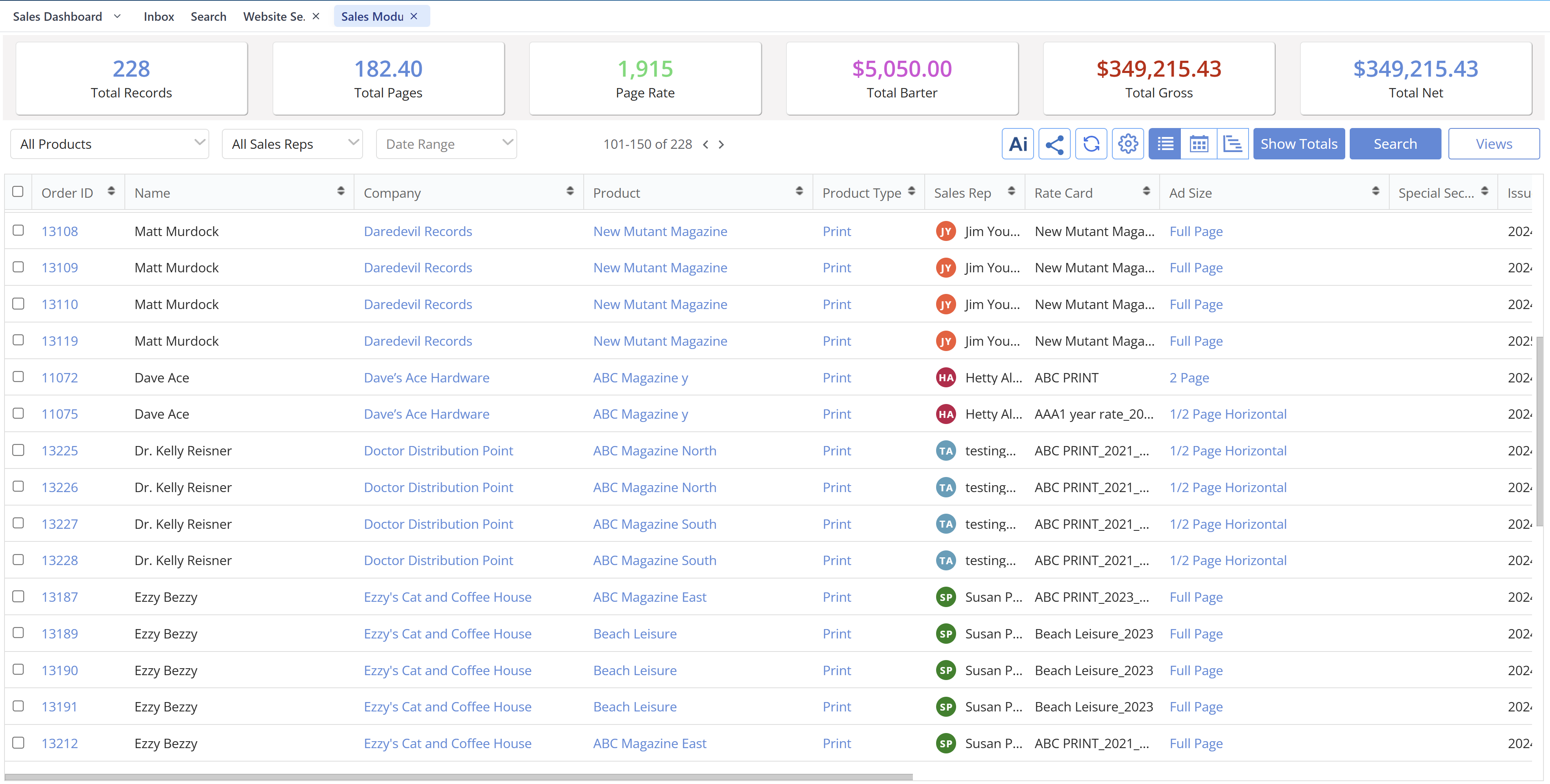
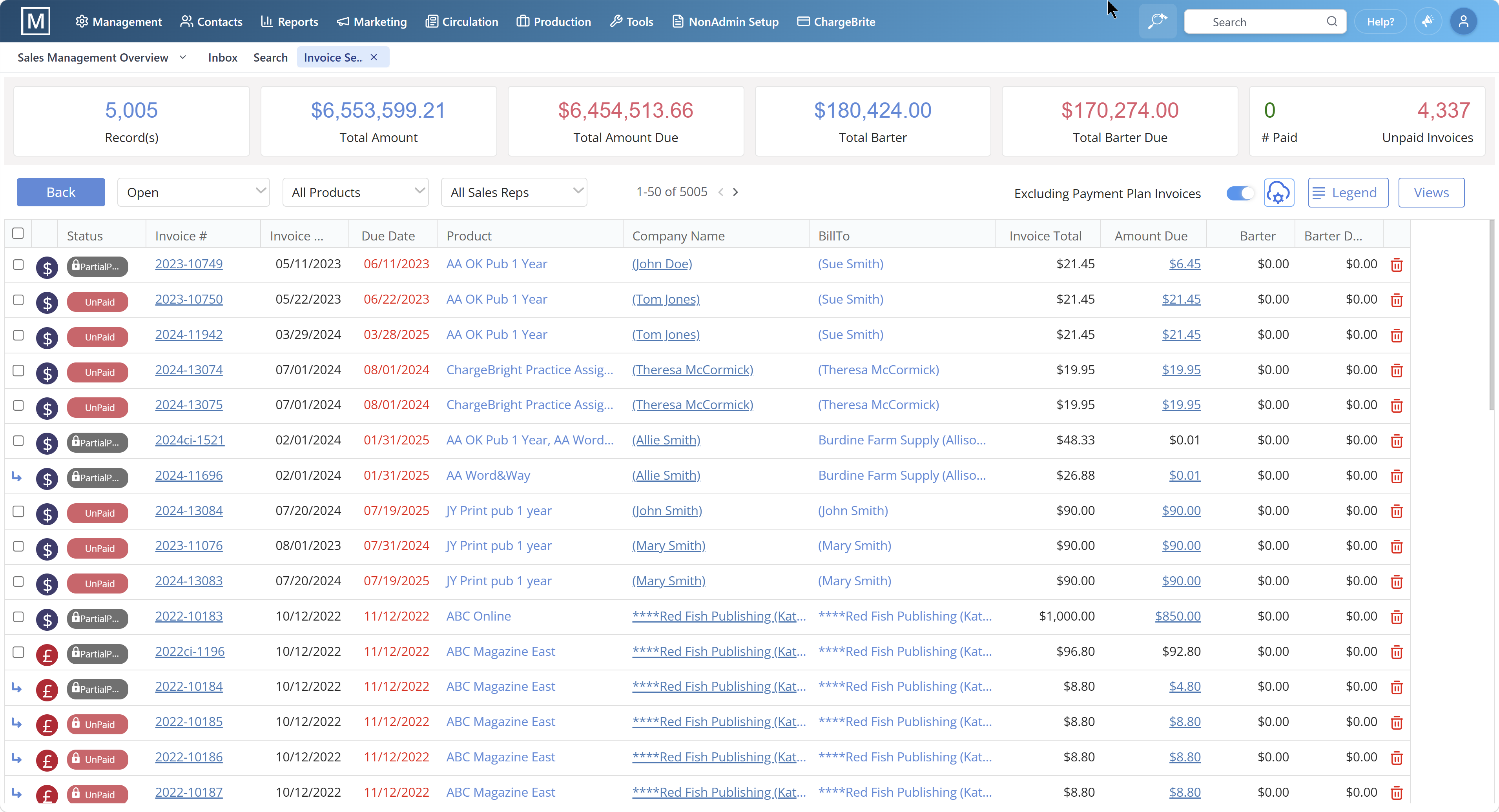
Magazine billing software automates the creation, delivery, and tracking of invoices for print and digital advertising. Unlike generic accounting tools, magazine billing systems understand insertion orders, rate cards, multi-issue contracts, and recurring billing cycles. Magazine Manager's billing module is integrated with the CRM, so every ad order automatically generates an invoice with the correct line items, pricing, and payment terms. Payment posting updates the customer record in real time, and A/R aging reports show exactly which accounts need follow-up. This eliminates the need for separate invoicing tools or manual data entry between sales and accounting.

Sales rep creates an ad order in the CRM, specifying issue dates, ad sizes, rates, and payment terms.
On the invoice run date, Magazine Manager auto-generates invoices for all scheduled orders.
Invoices are emailed directly to clients or made available via the client portal.
Clients pay via credit card, ACH, or check. Payments are posted in Magazine Manager and synced to QuickBooks or Xero.
A/R aging reports update in real time, flagging overdue accounts for collections follow-up.
Recurring contracts auto-create invoices for each issue, eliminating manual re-entry. This workflow reduces billing time and ensures accounting and sales always see the same data.
Everything you need to bill faster, collect sooner, and reduce overhead
Multi-issue contracts auto-create invoices for each scheduled insertion. No manual re-entry required.
Post payments instantly and update customer balances across the CRM, billing, and accounting modules.
See which accounts are overdue at a glance. Export aging summaries for collections or executive review.
Clients can view invoices, upload ads, and pay electronically 24/7 via secure portal access.
Sync invoices, payments, and customer records directly to your accounting system—no CSV exports or manual reconciliation.
Set custom payment terms per client, issue, or contract. Track deposits, installments, and prepayments.
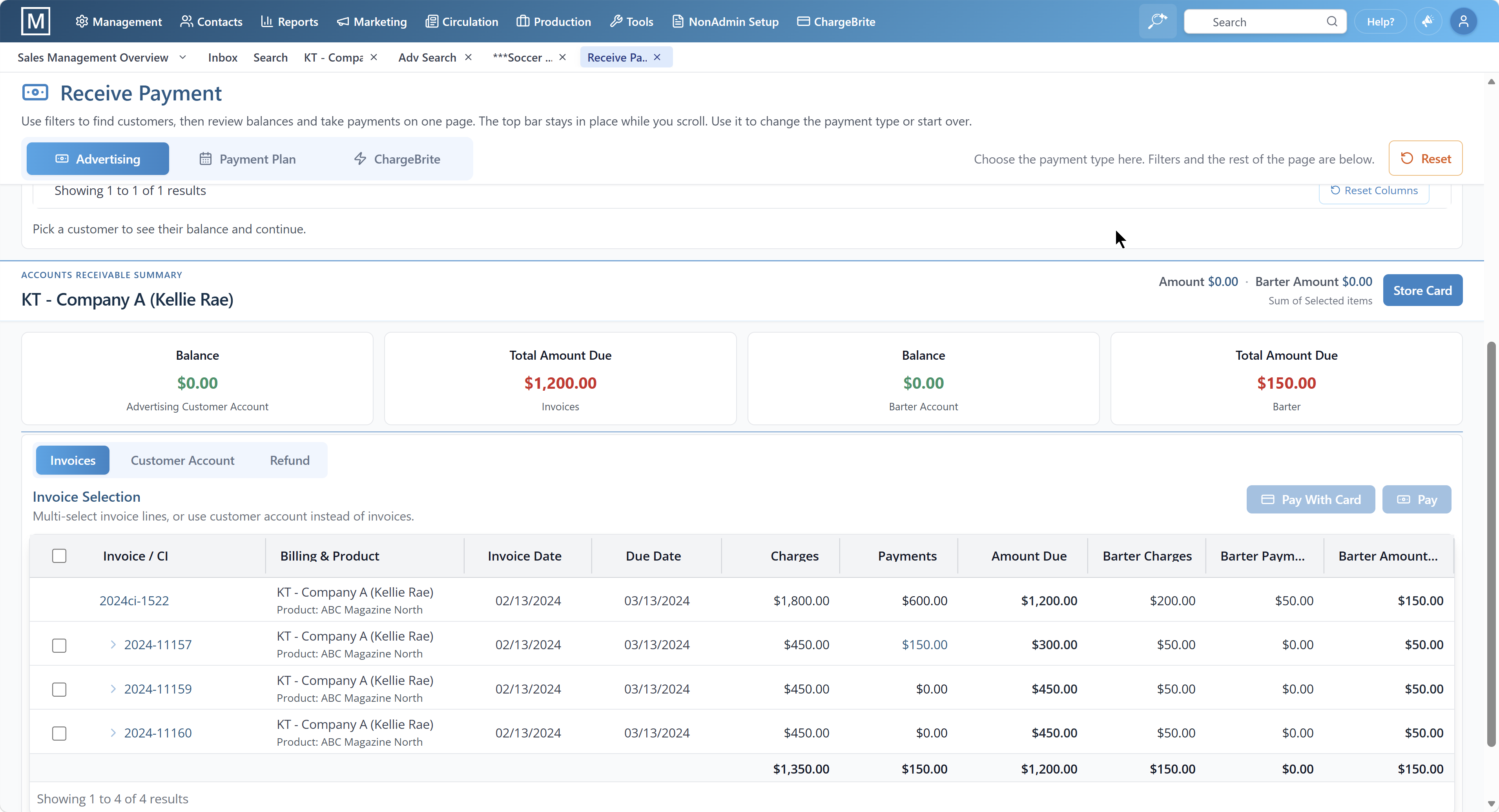
Generic accounting tools like QuickBooks or FreshBooks were not designed for magazine ad sales. They do not understand insertion orders, multi-issue contracts, or recurring billing cycles. Magazine Manager's billing module is built specifically for publishing workflows. Every ad order in the CRM automatically becomes an invoice. Multi-issue contracts generate invoices for each scheduled insertion without manual re-entry. Payment posting updates the customer record in real time, so sales reps always see current balances. A/R aging reports are designed for publishing—grouped by issue, advertiser, or sales rep. This eliminates the need for separate invoicing tools, reduces billing errors, and saves manual work each issue cycle.
See how The Magazine Manager automates your billing, invoicing, and ad management workflows — in one short walkthrough.
Why publishing-native billing saves time and reduces errors
| Feature |
✓
Magazine Manager
Publishing-native billing |
✗
Generic Accounting
Not built for publishing |
|---|---|---|
|
✦
Multi-issue contract invoicing
|
✓
Auto-generates invoices for each scheduled insertion
|
✗
Requires manual invoice creation per issue
|
|
✦
CRM integration
|
✓
Ad orders and invoices share the same database
|
✗
Separate systems require dual entry
|
|
✦
A/R aging by issue
|
✓
Group aging reports by issue, advertiser, or rep
|
✗
Generic aging reports not designed for publishing
|
|
✦
Client payment portals
|
✓
Clients view invoices and pay online 24/7
|
✗
No client portal or requires third-party add-on
|
|
✦
QuickBooks/Xero sync
|
✓
Native two-way sync with no manual reconciliation
|
✗
CSV exports or manual entry required
|
Magazine Manager
✓ Auto-generates invoices for each scheduled insertion
Generic Accounting
✗ Requires manual invoice creation per issue
Magazine Manager
✓ Ad orders and invoices share the same database
Generic Accounting
✗ Separate systems require dual entry
Magazine Manager
✓ Group aging reports by issue, advertiser, or rep
Generic Accounting
✗ Generic aging reports not designed for publishing
Magazine Manager
✓ Clients view invoices and pay online 24/7
Generic Accounting
✗ No client portal or requires third-party add-on
Magazine Manager
✓ Native two-way sync with no manual reconciliation
Generic Accounting
✗ CSV exports or manual entry required
Using spreadsheets to track invoices and payments leads to version control issues, duplicate entries, and missed payments.
Manually creating invoices for multi-issue contracts wastes time each issue cycle and increases the risk of billing errors.
When sales and accounting use separate systems, customer balances are always out of date and errors multiply.
Without automated aging summaries, overdue accounts slip through the cracks and collections suffer.
Requiring clients to mail checks or call to pay creates friction. Online payment options reduce delays and accelerate cash flow.
By integrating billing, CRM, and accounting in one unified platform, every one of these mistakes becomes a thing of the past.
Real feedback from Capterra reviews
"This software changed our lives at work! Magazine Manager is specifically designed for those of us in the print and digital publishing industry and it is crucial to our sales success. We are able to quickly and easily pull targeted email lists to generate sales, electronically invoice clients in literally minutes, take payments, and with a click of a button know what our clients' ad schedules are, what they have paid and what they owe."
"I honestly can't imagine doing my job both as a sales representative and as owner of our publication/website without having Magazine Manager as a tool."
"Magazine Manager is tailored to our industry. With CRM, billing, and production modules everyone uses the same software making it much easier for everyone to do their job."


Yes. Multi-issue contracts auto-create invoices for each scheduled insertion. Sales reps enter the contract once, and Magazine Manager generates invoices automatically on the run date for each issue. This eliminates manual re-entry and reduces billing errors.
Yes. Magazine Manager syncs invoices, payments, and customer records directly to QuickBooks and Xero. This eliminates manual CSV exports and ensures accounting and sales always see the same data. The integration is two-way, so payments posted in QuickBooks update Magazine Manager in real time.
Yes. Magazine Manager includes client payment portals where advertisers can view invoices, upload ads, and pay electronically via credit card or ACH. This reduces payment friction and accelerates cash flow. Clients can access their portal 24/7 without calling or emailing your team.
A/R aging reports in Magazine Manager are designed specifically for publishing workflows. You can group aging summaries by issue, advertiser, sales rep, or publication. Reports update in real time as payments are posted, so you always know which accounts need collections follow-up. Export aging reports to CSV or PDF for executive review or accounting reconciliation.
Yes. Magazine Manager allows you to set custom payment terms for each client, contract, or issue. Track deposits, installments, prepayments, and net terms. Payment terms are stored in the customer record and automatically applied to new invoices, ensuring consistency across your billing workflow.
Magazine Manager supports credit card, ACH, check, and wire transfer payments. Clients can pay online via the client portal using credit card or ACH. Your team can post check and wire payments manually. All payment methods update the customer balance in real time and sync to QuickBooks or Xero.
Manual billing workflows cost magazine publishers time and resources in wasted labor and lost revenue. Every hour spent manually creating invoices, chasing payments, or reconciling spreadsheets is an hour not spent selling ads or serving clients. Billing automation eliminates these inefficiencies by integrating ad orders, invoices, and payments in one system. Multi-issue contracts auto-generate invoices for each scheduled insertion, reducing billing time significantly. Real-time payment posting ensures sales reps always see current customer balances, improving collections and reducing overdue accounts. Client payment portals reduce payment friction and accelerate cash flow by allowing advertisers to pay online 24/7. Publishers who automate billing workflows often report meaningful reductions in billing overhead and improvements in cash flow. Magazine Manager's billing module is designed specifically for these publishing workflows, making automation accessible to publishers of all sizes.
Magazine Manager's billing and invoicing system automates invoice generation for multi-issue ad contracts, tracks payments in real time, and eliminates manual data entry. Unlike generic accounting software, it understands insertion orders, recurring billing cycles, and magazine-specific payment terms.
Publishers save hours per week on billing tasks while reducing errors and accelerating cash flow. Key features include automated invoice creation for each scheduled insertion, integrated payment posting, A/R aging reports, and seamless integration with QuickBooks.
Ad orders created in the CRM automatically flow to billing—no duplicate entry required. The result: faster invoicing, fewer missed payments, and lower overhead costs.